

What are .Serva files
A.serva file is the Servamind encoded representation of your data in a single, portable binary format. The format is data-agnostic: it does not encode a specific domain or schema. How those bytes are interpreted, when training, serving, or integrating with other systems, is determined by your application and loading logic.
In practice:
- Extension:
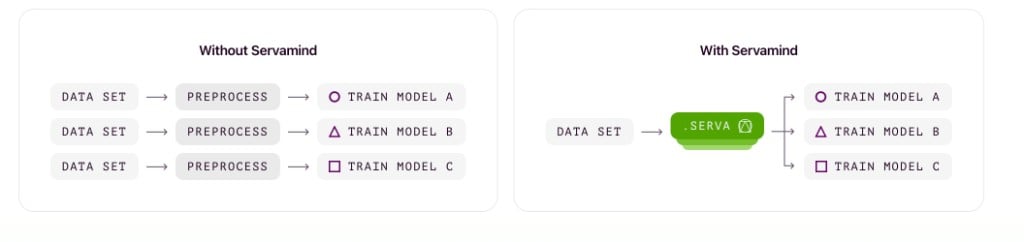
.serva. Encoding uses the Serva web app. One encoded artifact can feed training, analytics, and other downstream processes without maintaining a distinct preprocess pipeline for each consumer. - On disk,
.servafiles follow ordinary file semantics: path resolution, access permissions, and byte-level reads behave as they would for any other binary file.
Training in this documentation means training from scratch or pre-training, which is the expected use of the Serva Encoder web app.
Encoder and your data
Raw data and compression
The larger and messier, more raw data that is uploaded, the better compression rates you will see. Users should want to upload big data.AI dataset preparation
Upload the data files, convert them to.serva files, and load the encoded bytes directly into arrays for training. The data is already regularized by the encoding — no need to preprocess (for example PCA, z-whitening, normalization, cropping, etc.).
Multi-modal datasets
Convert a mixed file-type dataset (for example images, audio, text) to all.serva—then you have one dataset ready for model training with mixed media formats, as opposed to converting everything to all images, or all time series, etc.
Training efficiency
Cost: Training on a.serva dataset is cheaper in compute cost and OPEX (including data engineering / data scientist time) compared to training on a non-.serva dataset.
Energy: Training on a .serva dataset reduces overall GPU or CPU energy expenditure compared to training on the original dataset.
Speed: The overall time to train is less if training happens on .serva files compared to the same dataset not in .serva files.
Applications
Use.serva files when you need to:
- Encode raw inputs into Servamind’s compressed representation for storage, transfer, or reuse under one consistent contract.
- Distribute one artifact to multiple models, services, or teams—encode once, then consume independently (see the diagram above).
- Reference paths to
.servafiles in configuration or code—local directories, object storage, or other data locations your environment already uses. - Read bytes using your existing stack: direct file I/O, dataset abstractions, or custom loaders, according to your integration requirements.
How to use
- Encode via the web application. Sign in to the Serva web app, upload the source data, and download the resulting
.servafile. No additional encoding interfaces are available at this time. - Stage the files where your jobs expect them: local filesystems, cloud buckets, shared storage, or equivalent paths used for training data.
- Integrate with your pipeline. Load bytes in training or batch processes; the tutorials provide worked examples across common stacks (for example, PyTorch and NumPy).
- Consult the tutorials for end-to-end procedures and patterns.
Q&A
How do I obtain .serva files?
How do I obtain .serva files?
Use the Serva web app. Authenticate, upload the data to encode, run the encode step, and download the
.serva file. Subsequent steps (local use, training pipelines, and related workflows) are documented in the tutorials.Can I recover the original file from a .serva file?
Can I recover the original file from a .serva file?
Yes. Decode it in the web app and you’ll get the original content back.